没去除之前。
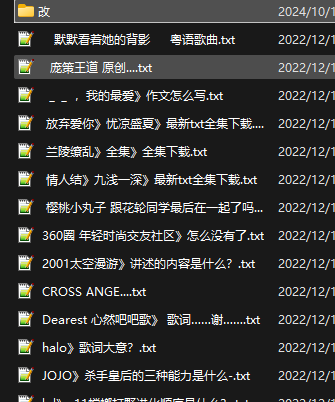
去除之后:

import os
import re

# 正则表达式:只保留中文字符
pattern = r"[^\u4e00-\u9fa5]"

# 获取当前脚本的目录
current_work_dir = os.path.dirname(__file__)

# 动态生成文件路径
source_folder = os.path.join(current_work_dir, '采集好的数据')
output_folder = os.path.join(source_folder, '改')

# 打印当前目录和生成的路径
print("Current working directory:", current_work_dir)
print("Source folder:", source_folder)
print("Output folder:", output_folder)

# 如果目标文件夹不存在,则创建
if not os.path.exists(output_folder):
    os.makedirs(output_folder)

# 批量处理文件
for filename in os.listdir(source_folder):
    if filename.endswith(".txt"):
        # 只保留中文字符作为新文件名
        new_filename = re.sub(pattern, "", filename)

        # 检查新文件名是否为空
        if not new_filename.strip():
            new_filename = "未命名文件"

        # 确保文件名后缀为 .txt
        new_filename += ".txt"

        # 构建原文件路径和新文件路径
        old_file_path = os.path.join(source_folder, filename)
        new_file_path = os.path.join(output_folder, new_filename)

        # 复制文件到新的文件夹并使用新文件名
        with open(old_file_path, "r", encoding="utf-8") as file:
            content = file.read()

        with open(new_file_path, "w", encoding="utf-8") as new_file:
            new_file.write(content)

        print(f"Processed: {filename} -> {new_filename}")

print("文件标题批处理完成!")
解释: Paid Content 检测到文章中存在 [HideArea] 隐藏内容。本段约 218 字,完成支付后会自动返回当前文章并刷新显示。 支付会在新窗口中打开,支付成功后本页自动刷新,同一浏览器再次打开无需重复支付。 支付成功后刷新显示,同一浏览器再次打开本文章时无需重复支付。¥9.90隐藏内容已加密,支付后自动显示
current_work_dir = os.path.dirname(_...
